
Product Deep Dive · July 2026
Instant TryOn and Pay Per Try-On: The Kiosk That Scans Any Garment
This month we shipped the two most requested features in the history of our virtual try-on kiosk. The first, Instant TryOn, removes the catalog from the equation entirely: a shopper holds any physical garment up to the kiosk camera and sees it on their own body seconds later. The second, Pay & TryOn, lets a store charge a small per-try-on fee over UPI, which turns the kiosk from a cost into a counter. This is a builder's account of how both actually work, including the decisions we got wrong before we got them right.
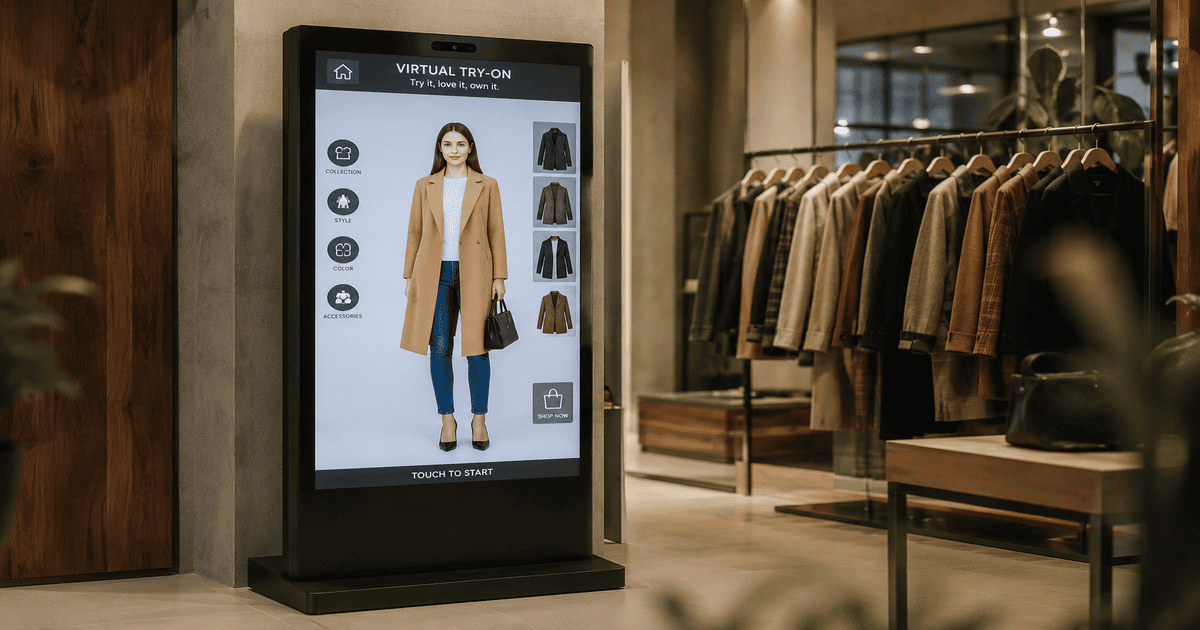
Why Catalogs Were the Ceiling
Every try-on kiosk on the market, ours included until July, worked from a synced product catalog. That is fine when the item a shopper wants is in the catalog. On a real shop floor it often is not. New stock arrives before anyone photographs it. A saleswoman drapes a saree over a mannequin that was never listed online. A shopper walks in holding a kurta from the clearance rail that was uploaded three seasons ago under a name nobody remembers. In each of those moments the kiosk, for all its intelligence, had to shrug.
The fix sounds obvious in hindsight: let the shopper show the kiosk the garment the same way they would show a friend. Hold it up. That is Instant TryOn, and as far as we can tell no other in-store try-on system does it this way, which is exactly why we are writing down how it works rather than keeping it vague.
Instant TryOn: Hold Anything Up to the Camera
The idea is one sentence. The shopper holds a physical item up to the kiosk camera, the AI finds the garment in the photo, lifts it out as a clean product image, and then dresses the shopper in it. No barcode scan, no product lookup, no waiting for a sync.
Our first build got the idea right and the experience wrong, and the mistakes are instructive. Version one drew a guide box on screen and asked the shopper to hold the garment inside it while standing in a marked spot. Real shoppers ignored the box, stood wherever they liked, and the results suffered. So we deleted the box and moved the intelligence to the server: stand however you want, hold the item however feels natural, and let the AI find it. Detection got harder for us and easier for the shopper, which is the correct direction for that trade.
Version two had a subtler flaw. We captured one photo of the shopper holding the garment and used it for both jobs, garment extraction and body rendering. The results came back with the shopper frozen in a holding-something pose, arms bent oddly across the chest. The fix was to split the moment in two: first a quick capture of the garment held up, then the shopper sets it aside and stands naturally for their own photo. The AI extracts the garment from the first frame while the second is being taken, so the wait feels like zero and the final image shows a person standing like a person.
In one line
Instant TryOn turns every garment in the building into a try-on candidate, including items that were never photographed, listed, or synced.
The Floor Flow, Step by Step
- Hold it up. The shopper taps Instant TryOn and holds the garment toward the camera. A short countdown fires the capture.
- Confirm the capture. The kiosk shows the exact photo and asks one plain question: can you see the garment clearly in this photo? Two buttons, Yes, Looks Good, or No, Retake. Retaking is free and instant. We added this screen after watching people burn detection attempts on blurry first tries, and it is the single change that made the feature feel reliable.
- Set it aside and pose. The shopper puts the garment down and stands naturally. While they pose, the AI is already extracting the garment in the background, and the kiosk shows the detected item full screen so the shopper can confirm it found the right thing.
- See the look. The engine renders the extracted garment onto the shopper's photo. The result arrives in seconds and can be sent to their phone with a QR code, exactly like a catalog try-on.
One more detail that never makes it into feature lists: results pass an automatic anatomy check before a shopper sees them. Generative rendering can very occasionally invent an artifact, an extra hand is the classic one, and on a public kiosk that is unacceptable. Every result is screened, and a flagged image is regenerated before display. Shoppers never know this happens, which is the point.
Pay & TryOn: The Kiosk That Pays for Itself
Free try-ons make sense in a boutique, where the try-on is the top of a purchase funnel. But some of the busiest placements for a kiosk are not boutiques. Exhibition halls. Mall atriums during festive season. Bridal markets where one shopper tries eleven lehengas with no intention of buying today. Store owners kept asking the same question: can I charge for this?
Pay & TryOn is the answer, and the mechanics matter more than the headline. The store owner sets a price per try-on, anything from 1 to 1,000 rupees. When it is enabled, a shopper who taps Try It On sees a payment screen with a single-use UPI QR for exactly that amount. They scan with any UPI app, GPay, PhonePe, Paytm, whatever is on their phone. The payment is verified server side, never trusted from the kiosk itself, and the try-on unlocks the moment the money lands, usually one to two seconds after the shopper's UPI app confirms.
- One payment, one try-on. Each QR is single use and expires after a few minutes if nobody pays. A payment can never be replayed into a second try-on.
- The shopper can never lose money. If a try-on fails after payment for any technical reason, the credit returns automatically and the retry runs free. This rule is enforced by the system, not by staff goodwill.
- The price lives on the server. The kiosk never decides what to charge, it only displays what the store configured, so a tampered device cannot discount itself.
Where the Money Goes
Every rupee collected at the kiosk accrues to the store's balance, visible in a Kiosk Earnings tab in the merchant dashboard. The owner sees each payment with its timestamp and payment ID, can filter by date range, and can export the lot to CSV for their accountant. When the balance crosses 5,000 rupees, a payout button appears: enter bank details once, they are stored encrypted and reused next time, and the transfer lands within two business days. It is deliberately boring, the way money features should be.
What Should a Try-On Cost?
From the stores piloting this, three patterns are emerging. Boutiques that use the kiosk as a sales tool keep it free, the try-on earns its keep in conversions. High-footfall placements charge a token 10 to 30 rupees, enough to filter idle curiosity without deterring a genuine shopper, and the fee is often refunded against a purchase at the till. Event placements, wedding exhibitions especially, charge more, because a photorealistic saree or lehenga try-on that takes twenty seconds is itself the product, and shoppers happily pay for a shareable image of themselves in a garment they are considering for the biggest day of their year.
Running Both on One Machine
Both features are per-store switches, not separate products. A store can run a free catalog kiosk, a paid catalog kiosk, free Instant TryOn, paid everything, any combination. The catalog still syncs automatically from Shopify or WooCommerce, Instant TryOn covers everything the catalog misses, and Pay & TryOn sits in front of whichever flows the store chooses to charge for. Existing kiosks picked all of this up in a routine update with no hardware change, which is the quiet advantage of a kiosk that is software first.
If you run a clothing store and want to see either feature on a real machine, book a fifteen minute demo or start with the kiosk overview page. Bring a garment. Any garment. That is rather the point.
Questions Stores Ask
What is Instant TryOn on a virtual try-on kiosk?
Instant TryOn lets a shopper hold any physical garment from the rack up to the kiosk camera. The AI detects the garment in the photo, extracts it as a clean product image, and then renders it on the shopper's body. No catalog entry, no barcode, no product sync is needed, so it works for every item in the store the moment it arrives on the floor.
Does the shopper need to hold the garment in a special position?
No. Early versions of this kind of feature usually force a guide box or a fixed pose, and shoppers hate it. Instant TryOn lets the shopper stand naturally and simply hold the item up. The kiosk shows the exact photo it captured and asks one plain question, can you see the garment clearly, before anything is processed. If the answer is no, they retake it in two seconds.
How does Pay & TryOn charge shoppers?
The store owner sets a price per try-on, anywhere from 1 to 1,000 rupees. When a shopper starts a try-on, the kiosk shows a single-use UPI QR for exactly that amount. They scan it with GPay, PhonePe, Paytm or any UPI app, the payment is verified automatically within a second or two, and the try-on starts. One payment unlocks exactly one try-on.
What happens if the try-on fails after the shopper has paid?
The credit is returned automatically. The shopper's payment always buys one delivered result, so if a generation fails for any technical reason, the retry runs without asking them to pay again. Nobody loses money to a network blip, which matters enormously for trust on a shop floor.
How does the store owner receive the money collected at the kiosk?
Every payment accrues to a balance visible in the merchant dashboard, alongside a list of each payment with its payment ID and a CSV export for accounting. Once the balance crosses 5,000 rupees, the owner requests a payout to their bank account. Bank details are saved securely after the first payout, so the next one is a single click.
Can a store run Instant TryOn and a normal catalog on the same kiosk?
Yes. The catalog stays synced from the store's Shopify or WooCommerce backend as usual, and Instant TryOn appears as an extra button on the same screen. Shoppers who saw something on a mannequin use Instant TryOn, shoppers browsing the range use the catalog, and both can be covered by the same per-try-on price if Pay & TryOn is on.
Is a paid try-on kiosk realistic, will shoppers actually pay?
It depends on the placement. In a boutique where try-ons drive purchases, most stores keep them free. Pay & TryOn exists for high-footfall placements, malls, exhibitions, wedding and festive shopping seasons, where a saree or lehenga try-on that takes seconds and produces a shareable photo is itself worth a small fee, and where a free kiosk would be swamped by curiosity traffic.