
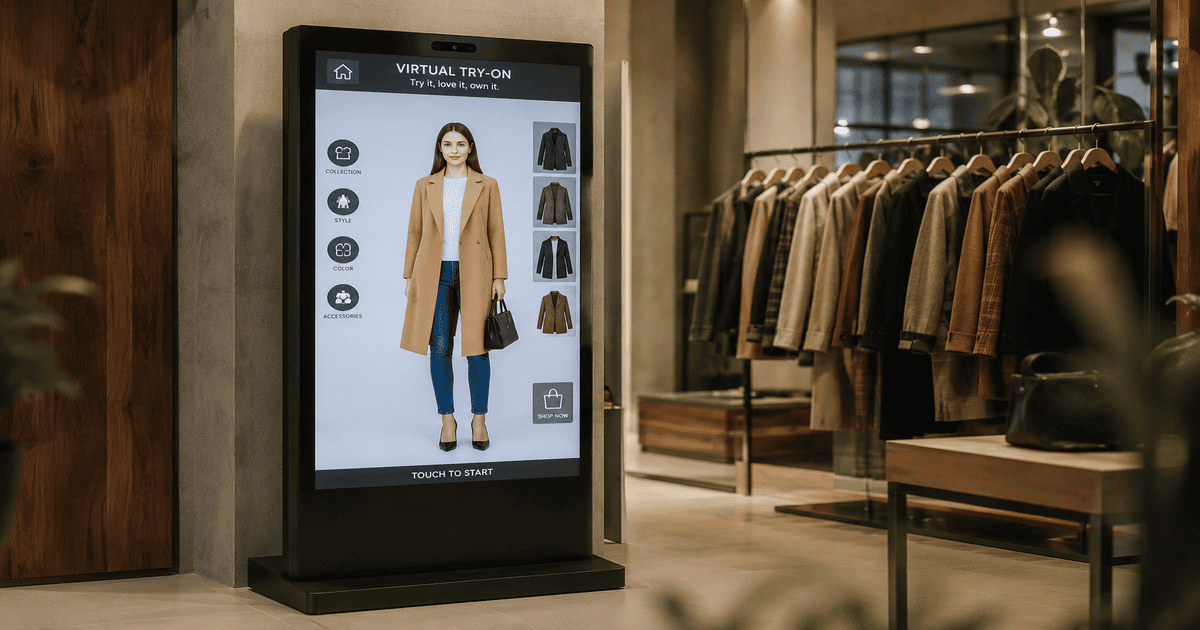
What Is a Virtual Try-On Kiosk?
A virtual try-on kiosk brings the convenience of online try-on into the physical store. Instead of carrying an armful of clothes to a changing room and waiting in line, a shopper walks up to the kiosk, taps the item they like, and instantly sees a photorealistic image of themselves wearing it. The whole interaction takes seconds and needs no assistance.
For the retailer, the kiosk is a self-service sales associate that never takes a break. It encourages shoppers to explore more products, removes the friction of fitting rooms, and captures the same conversion lift that virtual try-on delivers online. Because it runs in a browser and installs as a full-screen app on any touchscreen, there is no specialized hardware and no developer required.
How Does a Virtual Try-On Kiosk Work?
The shopper journey is built to be obvious enough that no instructions are needed. It works in four simple steps:
Step 1: Tap a product
The shopper browses the store's live catalog on the kiosk and taps the item they want to try on. Products are grouped into collections for fast discovery, with instant search.
Step 2: Take or scan a photo
They take a photo with the kiosk's built-in camera, or scan a QR code to upload a photo from their own phone — useful if they prefer a full-body shot they already have.
Step 3: AI generates the look
The engine produces a realistic image of the shopper wearing the item in roughly five to ten seconds, shown full-screen with a live progress animation.
Step 4: Download to phone
The shopper scans a QR code to save or share the result to their phone via a private link that expires shortly after — nothing is saved to the machine.
Key Features of the TryOnCloud Kiosk
Every feature is designed for a busy retail floor: fast, self-explanatory, and private by default. Here is what the kiosk gives your store.
Tap-to-try product browsing
Shoppers browse your real catalog, grouped into collections, with instant search. One tap starts a try-on.
Scan & Send from phone
A shopper can scan a QR code and upload a photo from their phone instead of using the kiosk camera.
Camera capture on the machine
A high-resolution camera captures a full-body shot on the kiosk, with on-screen guidance for the best result.
Download & share to phone
Results are saved to the shopper's phone by scanning a QR code — never to the kiosk, keeping it clean and private.
Results in seconds
The AI engine returns a realistic try-on in about five to ten seconds, with a live progress animation.
Your brand, your catalog
Set your store's brand colors and logo. Products sync automatically from Shopify or WooCommerce.
Instant TryOn: scan any garment
Shoppers hold any physical item up to the camera. The AI extracts the garment and renders it on their body, no catalog entry or barcode needed. New in July 2026.
Pay & TryOn: charge per try-on
Optionally charge shoppers per try-on with a single-use UPI QR (GPay, PhonePe, Paytm). Collected amounts accrue to your balance with bank payouts from your dashboard.
The two newest features, Instant TryOn and Pay & TryOn, are covered in depth in our builder's deep dive on Instant TryOn and pay-per-try-on, including how the garment scan works and what stores are charging.
Why Retail Stores Add a Virtual Try-On Kiosk
A try-on kiosk is not a gimmick — it changes the economics of the store floor. Here is what retailers gain.
| Benefit | What it means for your store |
|---|---|
| Higher conversion | Shoppers who see an item on themselves buy with more confidence. TryOnCloud stores see up to 40% higher conversions. |
| Fewer returns | Better purchase decisions mean fewer size and fit returns — up to 35% fewer. |
| No fitting-room queue | Self-service try-on keeps the floor moving and removes a major friction point. |
| More dwell time | An interactive kiosk gives shoppers a reason to engage with more of your catalog. |
| Lower staff load | Customers serve themselves, freeing associates for high-value selling. |
| Works after hours | Window or entrance kiosks can attract and engage even when the counter is busy. |
Who the Virtual Try-On Kiosk Is For
The kiosk fits any clothing retailer, from a single boutique to a multi-store chain. It handles every category of apparel.
How to Set Up a Kiosk in Your Store
Deployment is intentionally simple — no developer, no specialized hardware. You can be live the same day.
- 1
Register your store
Add the store in your TryOnCloud dashboard and get a Store ID and PIN.
- 2
Pair the machine
Open the kiosk URL on any touchscreen with a camera, enter the Store ID and PIN once, and install it as a full-screen app.
- 3
Sync your catalog
Your products sync automatically from Shopify or WooCommerce, grouped into collections.
- 4
Set your brand
Choose your brand colors and add your logo so the kiosk matches your store identity.
- 5
Go live
Place the kiosk on the floor. Shoppers start trying on immediately — no instructions needed.
Privacy: What Happens to the Shopper's Photo
The shopper's uploaded photo is used only to generate the try-on, then deleted immediately. The result image is held briefly so the shopper can download it via QR code, then it expires automatically. Nothing is saved to the kiosk machine, nothing is linked to the shopper's identity, and nothing is ever sold or shared.
See the Kiosk Live on Your Store
A 30-minute demo on a real catalog. We show setup, results, and answer every question.
Virtual Try-On Kiosk vs Traditional Fitting Room
Fitting rooms are a bottleneck: they take floor space, need cleaning, create queues, and only let a shopper try one outfit at a time. A kiosk removes all of that friction.
| Factor | Virtual try-on kiosk | Traditional fitting room |
|---|---|---|
| Time per try-on | ~7 seconds | 5-10 minutes |
| Queue | None — self-service | Common at peak times |
| Floor space | One small footprint | Multiple rooms |
| Items tried | Unlimited, instantly | One outfit at a time |
| Staff needed | None | Often required |
| Shareable result | Yes — to phone | No |
A kiosk does not replace the changing room entirely — some shoppers still want to feel the fabric — but it dramatically reduces the load on fitting rooms and gives every shopper an instant, shareable preview. Read our deeper comparison in virtual try-on kiosk vs fitting room.
Real-Time Results That Drive Sales
Speed is what makes an in-store kiosk work. A shopper will not wait a minute for a result, but they will happily wait a few seconds — and the live progress animation keeps them engaged the whole time. Because the try-on is photorealistic, shoppers trust what they see and buy with confidence. The result is fewer abandoned decisions, higher basket sizes, and the shareable moment of a shopper sending their look to a friend, which quietly markets your store.
Stores that add virtual try-on see up to 40% higher conversions and up to 35% fewer returns. In-store, the kiosk adds a third benefit: more dwell time, because shoppers stay to try more products.
Frequently Asked Questions
What is a virtual try-on kiosk?+
A virtual try-on kiosk is an in-store screen that lets shoppers see how clothing looks on them before they buy. The customer selects a product on the kiosk, takes a quick photo (or scans a QR code to use their phone), and AI generates a realistic image of them wearing the item in a few seconds. It works without any fitting room, staff assistance, or app download.
Can the kiosk try on garments that are not in my catalog?+
Yes. With Instant TryOn, a shopper holds any physical garment up to the kiosk camera, the AI detects and extracts it, and renders it on their body. No catalog entry, barcode, or product sync is needed, so new stock and unlisted items work the moment they reach the floor.
Can I charge shoppers per try-on?+
Yes. Pay & TryOn lets you set a price per try-on (1 to 1,000 rupees). The shopper scans a single-use UPI QR with GPay, PhonePe, Paytm or any UPI app, the payment is verified automatically, and one payment unlocks exactly one try-on. Collected amounts accrue to your balance and are paid out to your bank from the dashboard.
How does a virtual try-on kiosk work?+
It works in four steps: 1) The shopper taps a product on the kiosk screen. 2) They take a photo with the built-in camera or scan a QR code to upload one from their phone. 3) The AI engine generates a realistic try-on image in roughly five to ten seconds. 4) The shopper downloads or shares the result to their phone by scanning a QR code. The store keeps the queue moving with no physical changing room.
Do customers need to install an app?+
No. The TryOnCloud kiosk runs entirely on the in-store machine and in the shopper's mobile browser. Customers never download an app. To save a result they simply scan a QR code that opens a private link on their own phone, valid for a short time, then it expires automatically.
How long does a try-on take on the kiosk?+
A single try-on typically completes in about five to ten seconds from photo to result. The kiosk shows a live progress animation so the shopper knows it is working, and the finished image appears full-screen on the machine.
Does the kiosk work for ethnic wear like sarees, lehengas and kurtas?+
Yes. The kiosk handles full Indian ethnic wear — sarees, lehengas, kurtas, sherwanis — as well as Western wear like shirts, dresses, hoodies and t-shirts. It is built for clothing retail of every category.
How do I set up a kiosk in my store?+
Setup takes minutes. You register the store in your TryOnCloud dashboard, get a Store ID and PIN, then enter them once on the kiosk machine to pair it. Your product catalog syncs automatically from Shopify or WooCommerce, and you can set your brand colors so the screen matches your store.
Is the shopper's photo stored or shared?+
No. The shopper's uploaded photo is processed to generate the try-on and then deleted immediately. The result image is held briefly only so the shopper can download it via QR code, then it expires. Nothing is linked to the shopper's identity and nothing is sold or shared.
What hardware does the virtual try-on kiosk need?+
Any vertical touchscreen kiosk or large tablet with a camera and internet works. The kiosk runs in a browser and can be installed as a full-screen app on the device, so you do not need specialized hardware or a developer to deploy it.
How much does a virtual try-on kiosk cost?+
Pricing is based on your TryOnCloud plan and the number of try-ons your store runs, the same metered model as the online widget. There is no separate licensing fee for the kiosk software. Book a demo for a quote tailored to your store size and footfall.
Can the kiosk increase sales for my store?+
Yes. Virtual try-on reduces purchase hesitation and returns while increasing conversion. Stores using TryOnCloud see up to 40% higher conversions and up to 35% fewer returns. In-store, the kiosk also increases dwell time and gives shoppers a reason to engage with more products.