
AI Virtual Try-On App for Shopify Clothing Stores
The virtual try-on app for fashion ecommerce stores that reduces returns by 35%, boosts conversions by 40%, and auto-captures guest emails after every try-on.


Drag to compare · Result in about 7 seconds
What's Included
Virtual Try-On Built for Fashion & Clothing Ecommerce Stores
Built to reduce returns, grow your customer list, and prove which try-ons drove revenue, with zero development work
Know What Drives Your Sales
Know exactly which garments are driving your sales. See how much revenue each try-on influenced, so you stock more of what shoppers actually buy.
Auto Lead Capture
After a shopper's 2nd try-on, their email is captured automatically. All leads saved to your dashboard with product tried, date, and Shopify tag status.
Your Logo on Every Try-On
Growth & ScaleOn Growth and Scale, your own logo is baked into every try-on result and stays on the image when shoppers download or share it. Your brand travels with every look.
Shopify Segment Auto-Created
"Virtual Try-On Users by TryOnCloud" segment created on install. Use for email campaigns in Shopify Marketing, zero setup required.
Indian & Western Wear
Supports sarees, lehengas, kurtis, sherwanis, dresses, tops, and more. Works on all skin tones.
Multi-Platform
Native plugins for Shopify and WordPress/WooCommerce. Any platform via REST API.
Simple REST API
Clean documentation. Integrate virtual try-on into any platform in minutes.
Virtual Try-On Kiosk for Physical Clothing Stores
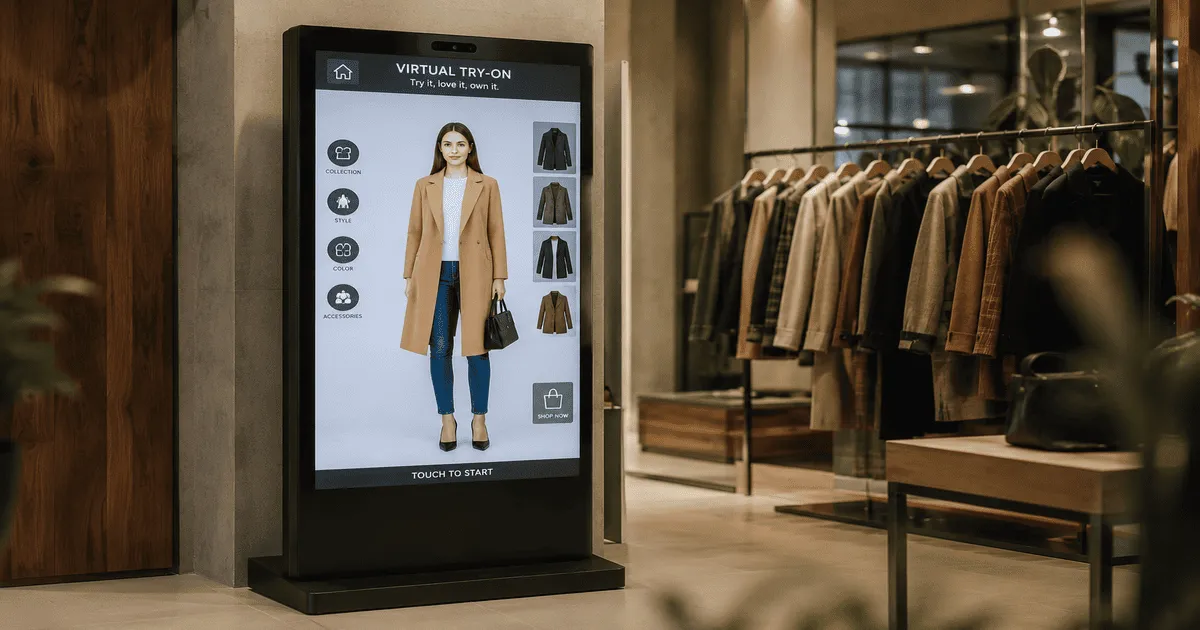
No website? Your store can still offer AI try-on. A self-service kiosk your shoppers walk up to, tap a product, and see themselves wearing it in seconds.
Instant TryOn: scan any garment
Shoppers hold any item from the rack up to the camera. The AI detects it and renders it on their body, no catalog entry or barcode needed.
Pay & TryOn: charge per try-on
Optionally charge shoppers per try-on with a single-use UPI QR. Collected amounts accrue to your balance with bank payouts from your dashboard.
Your catalog, synced automatically
Products sync from Shopify or WooCommerce, or run a custom catalog with no website at all. Your brand colors and logo on every screen.
 LIVE in stores
Every feature, in one virtual try-on app
From the 7-second AI try-on to lead capture, sales attribution, integrations and security, here is everything TryOnCloud does for your store.
AI Virtual Try-On
- Photorealistic results in 7 seconds
- Live selfie camera with flip support
- Indian ethnic and Western wear
- Accurate on every skin tone and body
- 2K HD output with smart auto-crop
Conversions and Leads
- Auto email capture after the 2nd try-on
- Shopify customer segment auto-created
- Purchase attribution, 30-day window
- Cross-device and cross-session tracking
- Klaviyo Try-On Lead event per try-on
Integrations and Platforms
- Shopify App Store, one-click install
- WooCommerce and WordPress plugin
- REST API for any custom site
- No-code theme app button block
- Signed outbound webhook to any CRM
Security and Trust
- Built-in content moderation
- GDPR friendly, photos deleted after use
- No watermark on result images
- 99.9% uptime over a global CDN
- Bank-level encryption
Pricing and Reach
- Free forever, 10 try-ons per month
- Flat, predictable pricing
- Available in 6 languages
- White-label developer API
Built for Developers and Agencies
- One API for Shopify, WooCommerce, web and mobile
- Flat price, about $0.10 per try-on, 43-68% margin
- HEIC, WebP, PNG and JPEG handled natively
- No watermark or badge in API responses
- Build and ship for clients under your own brand
Integrations
Turn Every Try-On Into a Marketing Signal
TryOnCloud captures the email of high-intent shoppers who tried your products, then pushes that signal into your marketing stack in real time, with no CSV exports.
Klaviyo
Connect Klaviyo in two clicks. Every completed try-on sends a Try-On Lead event to the shopper's Klaviyo profile with the product they tried, so you can trigger abandoned try-on flows and segment by product. Secure OAuth, no API keys, event-first and consent-safe.
Klaviyo setup guideWebhooks & CRM
Send every try-on lead to any CRM with a signed webhook: Zoho, Mailchimp, HubSpot, Salesforce, Brevo, ActiveCampaign, Zapier, Make, or your own backend. HMAC-SHA256 signed, HTTPS only, with guaranteed at-least-once delivery.
Webhook setup guideTurn Try-On Shoppers Into Customers, Automatically
Shoppers who try on are your highest-intent buyers. TryOnCloud captures their email after the 2nd try-on, tags them in Shopify, and auto-creates a customer segment, zero extra setup, zero manual work.
Auto Email Capture
After a shopper's 2nd try-on, a prompt captures their email, shown after the result so they've already seen value. No pop-ups, no interruptions.
Shopify Segment Auto-Created
Virtual Try-On Users by TryOnCloud segment is created on install. Use it to send targeted campaigns in Shopify Marketing, one click, zero setup.
Leads Dashboard & CSV Export
See every lead, email, product tried, date, and Shopify tag status. Export the full lead list as CSV anytime from the TryOnCloud Leads tab.
How lead capture works, 5 steps, fully automatic
Shopper tries on a garment on your product page
After 2nd try-on, email prompt appears post-result
Email saved to Leads dashboard + Shopify tag applied
Virtual Try-On Users segment updates automatically
Send retargeting email from Shopify Marketing
Verified Merchant Reviews
Merchants See Results in Their First Month
Over 10,000 Shopify and WooCommerce stores reduced returns and boosted conversions with AI virtual TryOn.
“Returns dropped from 38% to 22% in our first month. Customers love seeing the dress on their actual body type, not a size-2 model. We recovered $4,200 in returns the first month alone.”
−42% return rate
Sarah K.
Bloom & Thread · Austin, TX · Shopify
“Setup took 9 minutes. I expected it to be complicated but the WooCommerce plugin was dead simple. TryOn sessions now convert at 3× our site average. Insane ROI.”
3× conversion rate
James P.
ActiveEdge Sports · London, UK · WooCommerce
“We're a small sustainable brand, every return kills our margins. TryOnCloud cut our return rate by 31% in 8 weeks. The ROI was obvious by month two. Best $57/month I spend.”
−31% returns in 8 wks
Mei L.
Koko Label · Melbourne, AU · Shopify
“Men's fashion is notoriously hard to sell online, customers can't picture the fit. TryOn bridged that gap immediately. Conversion rate on TryOn sessions is 61% vs our 19% site average.”
61% TryOn conversion
Daniel R.
MonoForm Men · New York, NY · Shopify
“We sell traditional Indian wear, very hard for customers to visualise without trying on. Cart abandonment dropped 29% after adding TryOn. Wish I'd done this two years ago.”
−29% cart abandonment
Priya M.
Saffron Threads · Toronto, CA · WooCommerce
“The free plan was enough. Generated 80+ TryOns in the first week. Our conversion rate on TryOn sessions is 67% vs 18% site average. The numbers don't lie, this works.”
67% TryOn conversion
Emma W.
The Linen Room · Berlin, DE · Shopify
From the Blog
View all →Frequently Asked Questions
What is TryOnCloud?
TryOnCloud is a virtual try-on app for Shopify clothing stores. It adds a 'Try On Virtually' button to your product pages. Shoppers upload a photo and see themselves wearing your garment in 7 seconds. It reduces clothing return rates by 25-35% and increases conversions by up to 40%.
Does TryOnCloud work on Shopify?
Yes. TryOnCloud is available on the Shopify App Store and installs in one click. It works with all Shopify themes including Dawn, Debut, Impulse, and Prestige, no coding required.
How much does the Shopify virtual try-on app cost?
Every account gets 10 free virtual try-ons every month forever, no credit card required. Paid plans start at $19/month (100 try-ons), $57/month (300 try-ons), and $190/month (1,000 try-ons).
Will virtual try-on reduce my clothing return rate?
Yes. TryOnCloud merchants report 25-35% reduction in clothing return rates. Shoppers who see themselves wearing a garment before buying return it far less frequently.
How long does setup take?
Under 2 minutes. Install from the Shopify App Store, open Theme Editor, add the TryOn Button block to your product page, and save. No coding or developer needed.
Does TryOnCloud work with WooCommerce?
Yes. TryOnCloud supports both Shopify and WooCommerce via a WordPress plugin, and any custom platform via REST API.
Does TryOnCloud capture leads from virtual try-on?
Yes. After a shopper's 2nd try-on, TryOnCloud automatically captures their email. All leads are saved to the Leads dashboard with the product tried, date, and Shopify tag status. A 'Virtual Try-On Users by TryOnCloud' segment is auto-created on install, use it for targeted campaigns in Shopify Marketing. Full CSV export available.
Does TryOnCloud track which orders came from virtual try-ons?
Yes. TryOnCloud automatically attributes completed Shopify orders back to the try-on session that influenced the purchase. It matches orders using four methods: visitor fingerprint (Add to Cart and Buy Now purchases), Shopify customer ID (logged-in shoppers and third-party checkouts via Stripe, PayPal, Razorpay, Klarna, and all major checkout providers), cross-session fingerprint refresh (shoppers who try on, close the browser, and return to buy later), and cross-device email matching (shoppers who submitted their email after a try-on and purchase from a different device). The attribution window is 30 days. Attributed revenue and conversion data appear in the Analytics tab of your merchant dashboard.
Does TryOnCloud integrate with Klaviyo and my CRM?
Yes. TryOnCloud connects to Klaviyo in two clicks and sends a Try-On Lead event to the matching shopper profile after every virtual try-on, including the product they tried, so you can trigger flows and segment by product. For any other CRM, TryOnCloud's outbound webhook delivers each captured try-on lead in real time to a URL you control, working with Zoho, Mailchimp, HubSpot, Salesforce, Brevo, ActiveCampaign, Zapier, Make, and more. Webhook deliveries are signed with HMAC-SHA256 and retried until they land, so a brief outage never loses a lead.
The Best Virtual Try-On App for Shopify Clothing Stores
What is a Virtual Fitting Room for Shopify?
A virtual fitting room uses AI to show shoppers exactly how clothing looks on their own body before buying. TryOnCloud's AI virtual try-on API processes images in 7 seconds, delivering photorealistic results that reduce clothing returns by 25-35% and increase average order value.
Shopify Virtual Try-On App & WooCommerce Plugin
Install the TryOnCloud Shopify virtual try-on app or WooCommerce plugin in under 2 minutes, no coding required. Merchants report up to 40% higher conversion rates, 25-35% fewer clothing returns, and full purchase attribution that traces every sale back to the try-on that influenced it. See the setup guide →
- AI virtual try-on app for Shopify clothing stores
- Shopify App Store listed · WooCommerce plugin available
- No watermark on results, ever; white-label (badge removed) on Growth and higher plans
- 7s try-on generation using TryOnCloud's AI engine
- Up to 40% conversion rate increase on try-on sessions
- 10 free TryOns/month forever · Paid plans from $19/month
For developers & agencies
Build on the white-label virtual try-on API
Web, app and SaaS teams ship AI virtual try-on into the Shopify apps, WooCommerce plugins and custom storefronts they build for clients — one API call, flat pricing, fully white-label, Indian + Western wear.