
Retail Guide · 2026
Virtual Try-On Kiosk: The Complete Guide for Clothing Stores
Walk into most clothing stores and the bottleneck is the same: a line outside the fitting room, an armful of clothes, and a shopper who tries on three things, buys one, and leaves the rest in a heap. A virtual try-on kiosk attacks that exact moment. This guide is written for the person who runs the store, not the person who builds the software, and it covers what the kiosk does on the floor, the features worth caring about, and the numbers it actually changes.
What a Try-On Kiosk Really Is
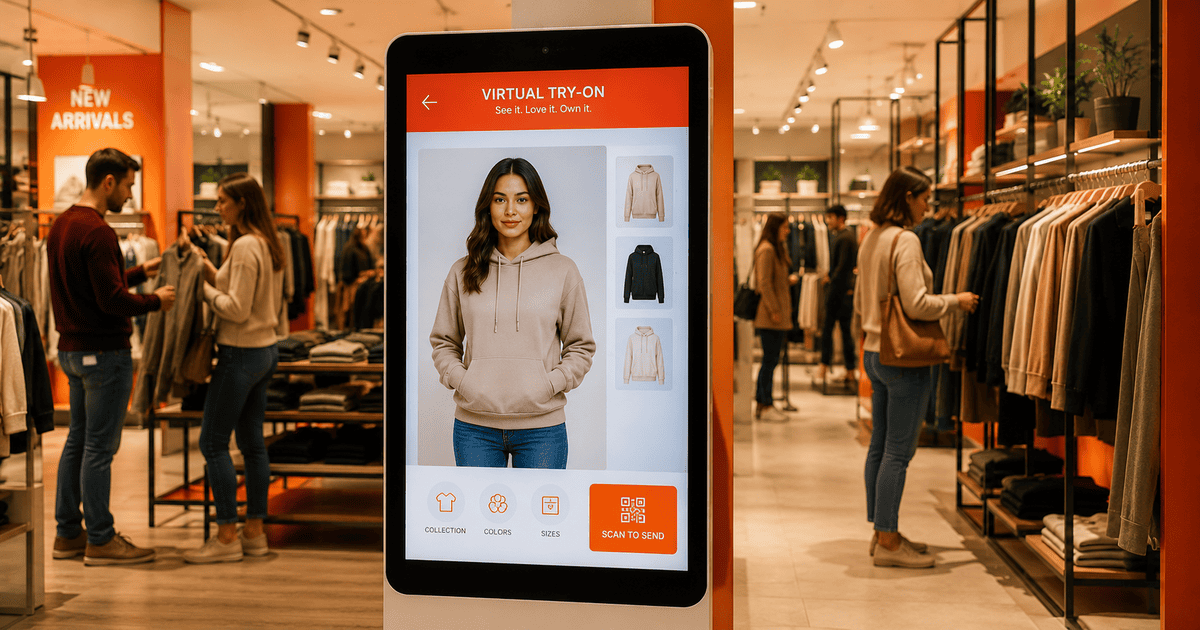
Strip away the marketing and a virtual try-on kiosk is one thing: a screen on your floor that shows a shopper what an item looks like on their own body, in seconds, without them undressing. They tap the product, the kiosk takes or borrows a photo of them, and a few seconds later they are looking at a believable picture of themselves wearing it. That is the whole trick — but the value is in how quickly and naturally it happens.
People confuse it with a smart mirror, and the two do share a goal. The difference is what the shopper walks away with. A mirror gives a fleeting live overlay; the moment they step aside, it is gone. A kiosk produces a finished image the shopper keeps on their phone. That image is the part that matters — it is what they show a friend, what they look at again before deciding, and what quietly markets your store when they send it on.
In one line
A virtual try-on kiosk is a self-service in-store screen that shows a shopper a realistic image of themselves wearing an item, in seconds, with no fitting room and no app.
What It Looks Like on the Floor
Picture a Saturday afternoon. A shopper sees a kurta they like but is not sure about the colour on them. Normally that is a fitting-room trip, and at peak hours that means a wait. With a kiosk near the rail, they tap the kurta on the screen, stand for a photo, and within a handful of seconds they see themselves in it. If they like it, they scan a code to send the image to their phone and carry on shopping. If they do not, they have lost ten seconds instead of ten minutes, and they are far more likely to try a second and third item because the cost of trying is now almost nothing.
That last point is the one most retailers underestimate. Fitting rooms ration try-ons; nobody hauls eight outfits into a cubicle. A kiosk removes the ration. A shopper will happily preview a dozen items because each one costs seconds, and every extra item they preview is another chance to convert. The kiosk does not just speed up the existing behaviour — it changes how much of your catalog a single shopper engages with.
The Features That Actually Matter
Plenty of try-on tools list features that sound good in a brochure and mean nothing on a busy floor. Here is what genuinely earns its place, and why.
| Feature | Why it matters on the floor |
|---|---|
| Tap-to-try browsing | The shopper picks from your real catalog on screen. No typing, no codes — one tap starts a try-on, so anyone can use it instantly. |
| Scan & Send from phone | Some shoppers want to use a full-body photo they already have. A QR scan lets them upload from their phone instead of the kiosk camera. |
| Phone download of the result | The finished image goes to their phone, not the machine. They keep it, share it, and the kiosk stays clean and private. |
| Seconds, not a minute | A result in seconds keeps the shopper standing there. A slow render loses them — speed is the difference between a tool used and a tool ignored. |
| Your brand and catalog | Brand colours and your synced products mean the kiosk feels like part of your store, not a generic gadget bolted on. |
| Privacy by default | The photo is used and deleted; the result expires. Shoppers trust a screen that visibly does not keep anything. |
Notice what is not on that list: gimmicks. A shopper does not care about animated transitions or novelty filters. They care that the image looks like them, that it appears fast, and that they can keep it. Everything else is noise.
The Numbers It Moves
Virtual try-on earns its place because of three measurable effects, and a kiosk delivers all three on the physical floor.
Conversion rises because seeing an item on yourself removes the doubt that kills a sale at the rail. Returns fall because a shopper who has already seen the fit and colour makes a better decision the first time — and in apparel, the return is where the margin quietly bleeds out. Dwell time rises because the kiosk gives people a reason to stay and play, and a shopper who stays longer buys more. None of these are abstract; they show up in your end-of-month numbers.
The return rate is the one to watch. In clothing, a high return rate eats the profit on the sale you celebrated. A kiosk that helps a shopper get the size and colour right the first time protects margin you would otherwise lose weeks later.
Getting One Running
The honest reason most stores have not added one is the assumption that it is a project — hardware, a developer, weeks of work. It is not. With TryOnCloud the kiosk runs in a browser on any vertical touchscreen with a camera. You register the store, get a Store ID and PIN, enter them once on the machine, and your catalog syncs from Shopify or WooCommerce automatically. Set your brand colours, install it as a full-screen app, and you are live the same day. There is no separate licensing fee for the software; you pay per try-on on the same plan as your online widget.
- 1
Register the store
Add it in your dashboard and grab the Store ID and PIN.
- 2
Pair the machine
Enter them once on the kiosk and install it as a full-screen app.
- 3
Sync the catalog
Products pull in automatically, grouped into collections.
- 4
Brand it
Add your colours and logo so it matches the store.
- 5
Place and go
Stand it near the rails. Shoppers start using it without a word.
Mistakes to Avoid
A kiosk is only as good as where you put it and how you light it. A few things separate a kiosk that gets used all day from one that gathers dust.
Hiding it in a corner
Put it where foot traffic already flows — near the entrance or the busiest rail. A kiosk nobody walks past is a kiosk nobody uses.
Poor lighting
The camera needs decent, even light to capture a clean photo. A dim spot produces dim captures and weaker results. Light the area properly.
No clear invitation
A short sign — 'See it on you in seconds' — gives the hesitant shopper permission to step up. Most people need one nudge.
Forgetting to sync
Keep your catalog current so the kiosk shows what is actually on the rails. A synced catalog is the difference between relevant and frustrating.
See a Kiosk Running on Your Catalog
A 30-minute demo, your products, every question answered.
Questions Retailers Ask
Is a virtual try-on kiosk the same as a smart mirror?+
They overlap but are not identical. A smart mirror usually shows a live overlay as you stand in front of it. A virtual try-on kiosk takes a still photo and renders a finished, photorealistic image you can download. The kiosk approach tends to be more accurate for fit and far easier to share, because the shopper walks away with an actual image on their phone.
Will a kiosk replace my fitting rooms?+
It reduces the load on them rather than replacing them outright. Many shoppers are happy to skip the changing room entirely once they see a realistic preview, which clears the queue for the people who genuinely want to feel the fabric. Stores typically keep one or two fitting rooms and add a kiosk to absorb the rush.
How many try-ons can a single kiosk handle in a day?+
There is no hard cap from the software — the limit is footfall and how fast people step up to the screen. Because each try-on takes seconds, a single well-placed kiosk can serve hundreds of shoppers across a busy trading day without slowing down.
Does the kiosk need staff to operate it?+
No. The whole point is that it is self-service. The flow is deliberately obvious — tap a product, take a photo, see the result — so a shopper who has never seen one before can complete a try-on without help. Staff are freed up to sell rather than supervise.
What clothing categories does it handle well?+
Tops, dresses, hoodies, t-shirts, shirts, and full ethnic wear like sarees, lehengas and kurtas all work. The engine is built for apparel of every cut, including draped and layered garments that are harder for simpler overlay tools.
Can I run a kiosk in a pop-up or seasonal store?+
Yes, and it is one of the best uses. Because there is no installation beyond pairing the machine and syncing your catalog, you can stand a kiosk up for a weekend market or a festive pop-up and take it down just as fast.